A large website can have thousands of pages. Each page may have its own SEO needs. Some pages may not appear on Google. Others may load slowly or have broken links. These problems can make it hard for search engines to find and understand your content.
Fixing every issue at once is not a good plan. It can waste time and money. Some errors may have little effect on your website. Others may stop important pages from reaching the right users.
The best approach is to find the most serious problems first. Then, fix them based on their impact on users and your business.
This process helps you manage large websites with less effort. It also gives your team a clear path to better site health. In this article, we explain how to find, rank, and fix technical SEO problems. We also show when expert support can help.
Start With a Full Website Audit
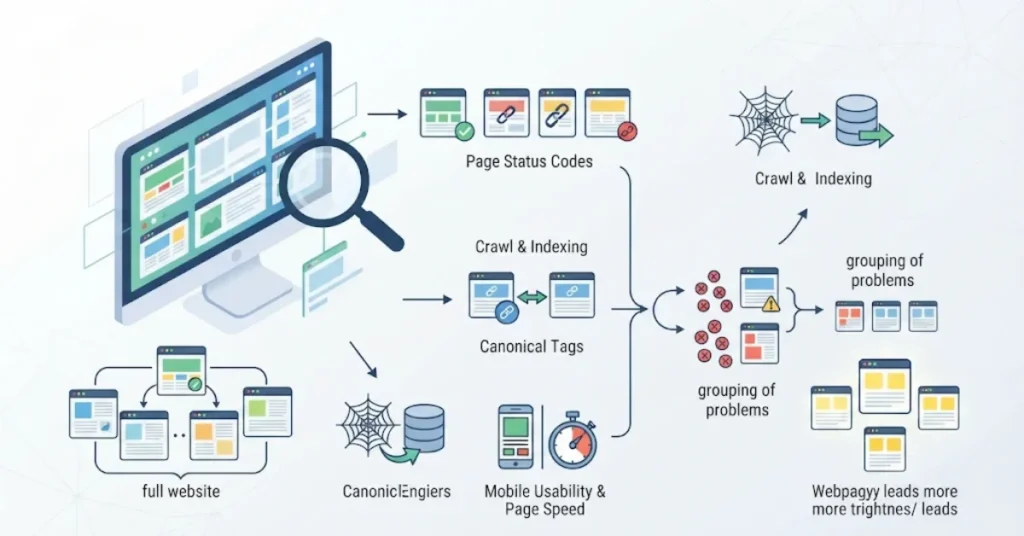
Before you make changes, check the full website. A technical audit shows where problems exist and which pages they affect.
Do not check only your homepage. Review service pages, blog posts, product pages, and category pages. Each page type may have different issues.
Use Google Search Console to check your site’s search health. You can also use a website crawler to find errors across many URLs.
Look at these areas first:
- Page status codes and broken URLs.
- Crawl and indexing errors.
- Missing or wrong canonical tags.
- Duplicate page versions.
- Mobile use and page speed.
Next, group similar problems together. For example, one broken website template may affect hundreds of pages. Fixing that template may solve many errors at once.
A good audit should also show which pages matter most. Give more attention to pages that bring visitors, sales, or leads.
Fix Important Crawling and Indexing Errors
Google needs to find and access your pages before it can consider them for search results. This makes crawling and indexing a key part of technical SEO.
Start with your robots.txt file. Check that it does not block pages you want Google to access. Then review your XML sitemap. It should list the correct page URLs.
Open Google Search Console and check the Page Indexing report. It shows pages that Google has found and their current status.
Do not try to index every page. Some pages should stay out of search results. Examples include private pages and duplicate URLs.
Focus on useful pages that support your business. Check their access, index settings, and links from other pages.
If your sitemap has errors, find the cause before sending it again. A wrong URL or redirect can stop Google from reading the file.
For more help, read our sitemap error fixing services. It explains common sitemap problems and how to address them.
Rank Each Problem by Business Impact
A large audit may show hundreds of issues. But not every issue needs the same level of attention.
Start by asking three simple questions:
- How many pages does this issue affect?
- Does it block an important page?
- How much effort will the fix need?
Use the answers to set a clear order for your work.
Priority Issue Action Critical Key pages blocked from GoogleFix firstHighBroken links on important pagesRepair soonMediumSlow page templatesPlan improvementsLowMinor image issues Add to routine work
For example, a noindex tag on your main service page can cause a serious problem. A missing image description on an old blog post may have less impact.
Your goal is to fix problems that affect the most valuable pages first.
This is also where a technical SEO audit helps. It gives your team a clear list of tasks. It also helps you avoid spending time on small issues while bigger problems remain.
Improve Page Speed and User Experience

A website should load well and work on mobile devices. Slow pages can make visitors leave before they find what they need.
Start by checking your Core Web Vitals. Google PageSpeed Insights can help you find areas that need work.
There are three main measures to review:
Largest Contentful Paint (LCP): This checks how fast the main content loads.
Interaction to Next Paint (INP): This checks how fast a page responds when users interact with it.
Cumulative Layout Shift (CLS): This checks if page items move without warning while the page loads.
Look for the cause of each problem. Large images, slow servers, and heavy scripts can affect page speed.
Do not focus only on a high test score. Check how the website feels on a real phone or computer. Make sure users can read content, open pages, and use forms with ease.
Fix shared page templates first when they cause the same problem across many URLs. This can save time and improve the whole site.
Fix Duplicate URLs and Weak Site Structure
Large websites often create many versions of the same page. This can happen through filters, tracking links, and old URLs.
Too many duplicate pages can make site management harder. Search engines may also have trouble finding the main page version.
Review your URL structure. Check that canonical tags point to the right pages. Use redirects when old URLs have a clear replacement.
Next, review your internal links. Important pages should be easy to reach from related pages. Avoid leaving useful content buried deep in your website.
Keep your site structure simple. Group pages by topic, service, or category. Use clear menu links and helpful page links.
Also check your page content. Each page should have a clear purpose. If two pages answer the same need, review whether both are useful.
A clean structure helps users move through your site. It also helps search engines understand how your pages connect.
Make Your Website Ready for AI Search
People now use AI tools to find answers, compare services, and explore products. Businesses want their websites to appear in these results.
There is no single technical fix that guarantees AI visibility. But a clear and accessible website gives search systems a better chance to read your content.
Start with the basics. Make sure important pages can be accessed. Use clear headings and simple page layouts. Write content that answers real customer questions.
You should also check your structured data. Use the right schema for your content, such as Organization, LocalBusiness, Product, or Article.
Only add schema that matches the page. Test it before you publish changes.
Good content still matters. Show what your business does, who it helps, and how people can contact you. Add real details and useful examples where they help readers.
These steps support a clear website for both people and search systems.
Connect Technical SEO With Local Search
Technical SEO can also support local search. A local business needs useful service pages and location pages that people can find.
Check that each important location page works well. It should load fast, have the right URL, and allow search engines to access it.
Avoid making many pages with the same text. Each location page should have a clear purpose and useful details about the area and services.
Also check that your website and Google Business Profile share correct business details.
If your business appears in search but still has weak local visibility, the cause may be more than a website error. Read why your business isn’t ranking locally. It explains other factors that can affect local search results.
For businesses that want stronger local reach, local SEO services and a clear website structure can work together. The goal is to help the right people find useful pages and take action.
Create a Regular Fixing and Testing Plan
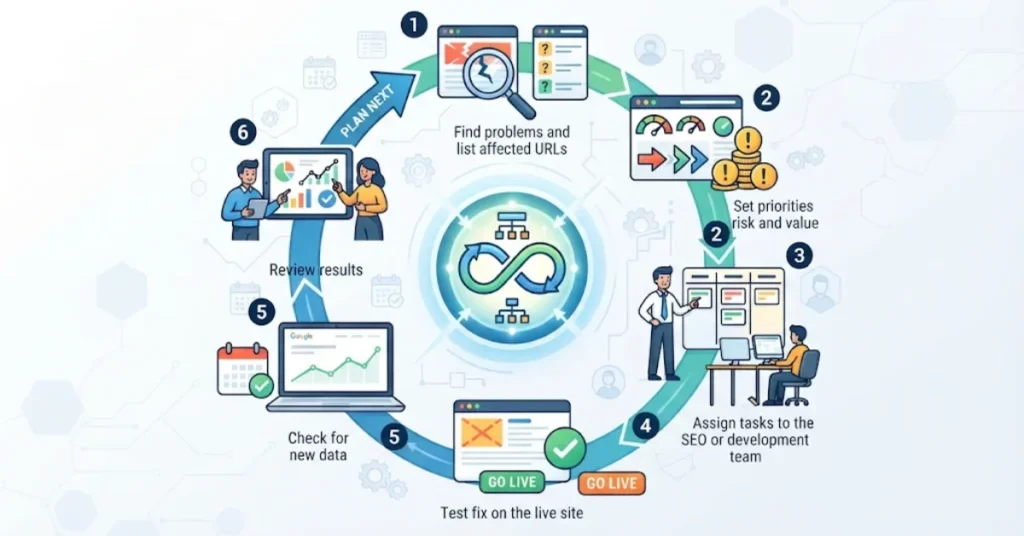
Technical work should not end after one audit. Websites change as teams add pages, update content, and install new tools.
Set a regular schedule to check your website. Give each task to the right person. Record what needs to change and how you will test it.
Follow these steps:
- Find the problem and list the affected URLs.
- Set a priority based on risk and value.
- Assign the task to your SEO or development team.
- Test the fix on the live website.
- Check Google Search Console for new data.
- Review results and plan the next task.
Keep a record of each change. This helps your team see what has been fixed. It also makes it easier to find the cause if a new problem appears.
After a sitemap or indexing change, check the reports again. Our article on resolving sitemap errors explains how to check sitemap status and inspect missing pages.
Do not expect every change to show results at once. Google needs time to crawl and process updated pages.
When Should You Hire a Technical SEO Team?
Some problems need help from an expert. This is common on websites with thousands of pages or complex systems.
You may need professional support when:
- Many important pages are missing from Google.
- A website update causes new crawl errors.
- Redirects and canonical tags are hard to manage.
- Page speed problems affect many templates.
- Your team needs help with a large website audit.
A good SEO team should explain each problem in clear words. It should show why the issue matters and how the fix will help.
Professional technical SEO services can help with audits, site structure, crawl checks, and ongoing reviews. The right plan should match your website and business goals.
Do not choose a service based only on promises of fast rankings. Look for clear work, useful reports, and a process you can track.