
Your website needs a clear path for search engines to find its pages. An XML sitemap helps Google discover important URLs. But errors can stop Google from reading the file or finding the pages inside it.
A missing file, broken redirect, or server error can create problems. These issues may affect how Google finds new pages. They can also make it harder to spot other website problems.
Fixing sitemap errors starts with finding the cause. You need to check the file, test its URLs, and review the results in Google Search Console. Simply sending the same sitemap again will not solve every problem.
For businesses that rely on search traffic, these checks matter. Missing pages can limit the reach of useful content and service pages. Professional technical SEO services can help find the cause and guide the right fixes.
This guide shows you how to repair sitemap issues, check page indexing, and improve website discovery.
Find the Cause of Your Sitemap Errors
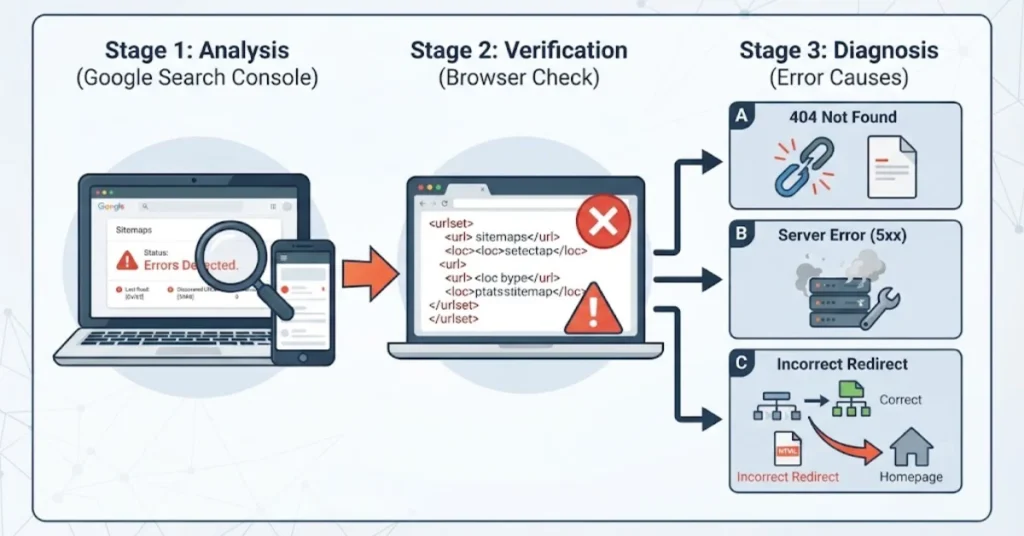
Start with Google Search Console. Open your website property and select the Sitemaps report. Check the status of your submitted file. Look for errors, the last read date, and any details about the problem.
Next, open the sitemap URL in your browser. Check whether it loads and shows XML content. A file that opens correctly is a good first sign, but it does not prove that every listed page works.
Different errors point to different causes.
A 404 error means the requested file cannot be found. A server error may point to a hosting problem. An unexpected redirect may send Google to the wrong page.
For example, your sitemap_index.xml file might redirect to your homepage. The homepage may load without trouble, but it is not a replacement for the sitemap file. Google may receive HTML instead of the expected XML.
Check the full redirect path. Confirm that the final URL points to the correct sitemap. If the file is missing, restore it or update the submitted address.
Also review recent website changes. A redesign, plugin update, or migration may have changed the sitemap URL. Finding the source of the error helps you choose the right fix.
Fix XML Sitemap Issues and Broken URLs
An XML sitemap must follow a clear format. Errors in its structure can stop search engines from reading it. Incorrect URLs can also cause trouble.
First, open the sitemap in a browser or use an XML validator. Check for missing tags, broken markup, and other format errors. If your site uses a sitemap index, make sure each child sitemap exists and loads correctly.
Then review the URLs inside the file. They should point to the correct versions of your pages. Use HTTPS when that is your site’s preferred version. Remove old URLs that no longer belong in the sitemap.
Check these common problems:
- Invalid XML: Correct broken tags and formatting errors.
- Broken URLs: Remove links that return errors or lead to deleted pages.
- Redirects: Replace old URLs with the correct final addresses.
- Duplicate URLs: Keep the preferred version of each page.
- Wrong sitemap links: Fix missing or invalid child sitemap files.
WordPress users should check their SEO plugin settings. Plugins often create sitemap files for you. A setting change or plugin conflict may affect the output.
Custom websites may need a developer to fix the sitemap code. The same applies when a server rule changes the file’s response.
After making changes, test the sitemap again. Make sure it returns valid XML and lists the right pages. A correct sitemap helps Google find URLs, but it does not guarantee that Google will index them.
Resolve Google Search Console Sitemap Errors
Google Search Console can help you find out why a sitemap failed. The exact error message matters because each problem needs a different fix.
If your sitemap submission failed, check the submitted address first. Make sure the file exists and that Google can access it. Look for server errors, access limits, and incorrect URL paths.
If Search Console reports that the sitemap was not found, check whether the file has moved or been deleted. Restore the file or submit its correct location.
A sitemap redirect error needs a closer check. Follow the redirect from the original URL to the final destination. If it ends at the homepage or another unrelated page, correct the redirect rule. You can also submit the correct sitemap URL.
Next, check your robots.txt file. It can include a line that points search engines to your sitemap. Make sure the address is correct and that the file can be reached.
Once you fix the problem, return to Google Search Console. Submit the correct sitemap if needed. Then check the report for new status updates.
Do not keep submitting the same broken file. Repeated submissions will not fix a bad URL or a server problem.
For business websites, pay close attention to service pages and product pages. These pages may bring in valuable visitors and customer inquiries. Make sure Google can discover them through both the sitemap and internal links.
Find Out Why Google Has Not Indexed Your Pages
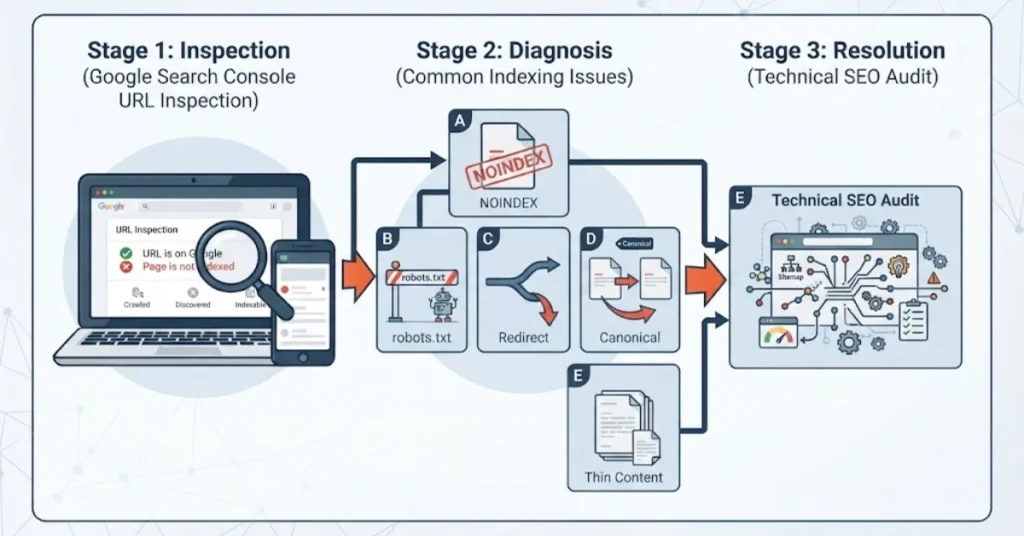
A sitemap can work well even when some pages remain outside Google’s index. This means you need to check the pages, not just the file.
Open Google Search Console and use URL Inspection. Enter the address of a page you want Google to index. Review the report to see whether Google can access the page and which URL it treats as the main version.
Look for common issues:
- A noindex tag tells search engines not to index the page.
- A robots.txt rule may block crawling.
- A redirect may send visitors and search engines to another URL.
- A canonical tag may point to a different page.
- Thin or copied content may offer little value to searchers.
Fix only the issues that need to change. For example, do not remove a noindex tag from a private page that should stay out of search results.
Next, review the content itself. Each important page should answer a clear question or meet a real customer need. Service pages should explain what you offer, who can benefit, and how to contact your business.
Avoid publishing many pages that cover the same topic in nearly the same way. Give each page a clear purpose. Link related pages where the links help readers find useful information.
If many pages remain unindexed, a technical SEO audit can help you find the cause. It can reveal problems with crawling, page settings, duplicate content, and internal links.
Use Technical SEO Services to Improve Page Discovery
Fixing one sitemap error is useful, but it may not solve every website problem. A wider review can help you find issues that affect many pages.
Start by checking how your sitemap is made and updated. It should reflect the current website. New pages should appear when eligible, while deleted or redirected URLs should not remain as active entries.
Large websites may need separate sitemaps for different types of content. This can make the files easier to manage. Each sitemap must still follow the correct format and point to valid URLs.
A wider technical SEO review should cover these areas:
- Crawling: Check whether Google can access important pages.
- Internal links: Connect related pages through useful links.
- Redirects: Remove broken rules and unnecessary redirect chains.
- Server health: Check for repeated errors and failed requests.
- Page quality: Find duplicate, outdated, or weak content.
These checks can help after a website redesign, migration, or major update. They can also help when search impressions fall and the cause is unclear.
Rank Locale offers SEO and website optimization services for businesses across the USA. Our team can review sitemap errors, crawl issues, indexing problems, redirects, and website structure.
The right solution depends on your website. Some sites need a small correction. Others need a wider technical review to find problems across many pages.
Professional support can help you understand which issues matter most. It can also give your team a clear plan for fixing them. The goal is to build a sound technical base for organic search, not to promise instant rankings.
Check Your Fixes and Track Results
After fixing a sitemap, test it again. Open the URL and confirm that it returns the correct XML file. Check that its listed URLs lead to the right pages.
Then return to Google Search Console. Review the Sitemaps report for updated information. If the file still shows an error, check the message and test the URL again.
Use URL Inspection to check a few important pages. Confirm that Google can crawl them and that the indexing settings are correct. You can request indexing for eligible pages after fixing the problem, but Google does not guarantee inclusion.
Next, track your website’s performance. Search Console shows impressions, clicks, and other useful search data. Review these figures over the following days and weeks.
Keep a record of the error and the fix. Note when you made the change and when you checked it. This can help you spot problems after future updates.
If the same error returns, look for a deeper cause. A plugin, redirect rule, cache setting, or sitemap generator may be creating the problem again.
Regular technical checks can help businesses find these issues before they affect more pages. They also help separate sitemap problems from other causes of poor search performance.