A drop in Google Search impressions can be a warning sign, but it does not always mean your website has lost rankings. Your pages may be appearing for fewer searches, losing visibility for important keywords, or reaching an audience that is no longer searching for the same topics.
The challenge is finding the real cause before making changes. Publishing more blogs, rewriting page titles, or building links without reviewing the data can waste time and money.
A better approach starts with Google Search Console. It helps you see which pages appear in search results, which queries bring impressions, and how your website’s visibility changes over time.
This guide explains how to investigate declining impressions, identify possible causes, and decide what to fix first. The goal is to make informed SEO decisions instead of guessing.
Compare Search Console Data Before Changing Your Website
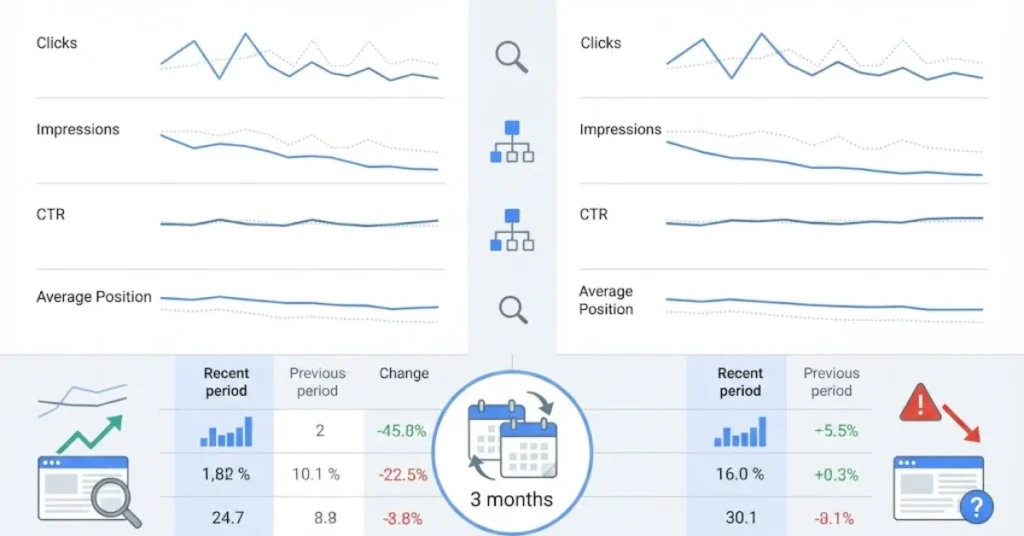
Start by opening Google Search Console and selecting Performance → Search results. Choose a suitable date range and compare it with an earlier period.
For example, compare the last three months with the previous three months. If your website has seasonal traffic, compare the same period from the previous year as well.
Review these four metrics:
- Impressions: How often your website appeared in Google Search results.
- Clicks: How many clicks your website received from those results.
- Average position: The average position of your results for recorded searches.
- Click-through rate (CTR): The percentage of impressions that resulted in clicks.
Look for patterns rather than relying on one metric. If impressions and average position both decline, some pages may be losing search visibility. If impressions fall but average position stays similar, changes in search demand or query coverage may be involved.
These patterns are clues, not proof of a specific cause. Check the affected pages and queries before deciding what to change.
Also, compare similar periods and account for seasonal demand. A business may receive fewer searches during certain months without having a technical SEO problem.
Find the Pages and Keywords Losing Visibility
Once you confirm a decline, identify where it is happening. In Search Console, open the Pages tab and compare performance across the selected periods.
Export the data if needed. Sort pages by the difference in impressions, starting with those that lost the most visibility.
Next, open the Queries tab. Look for search terms that previously generated impressions but now appear less often.
Ask these questions:
- Are important service pages losing impressions?
- Are several blog posts affected at the same time?
- Have commercial keywords declined more than informational searches?
- Are the losses limited to a particular country, device, or search type?
This process helps separate a website-wide problem from a page-specific issue.
For example, if many unrelated pages decline at once, investigate technical changes, sitewide templates, and broader search trends. If only one article loses visibility, review its search intent, content, and competing results first.
For a US-focused business, apply the United States country filter. This helps you understand whether your target audience is losing visibility even if impressions from other countries remain stable.
Check Whether Google Can Access Your Important Pages
A page cannot perform well in organic search if Google cannot properly access or index it. However, indexing problems are only one possible reason for declining impressions.
Use URL Inspection in Search Console to examine your most important pages. Start with service pages that support your business goals, followed by articles that previously attracted relevant search traffic.
Check the following:
- Is the page indexed?
- Does Google identify the intended canonical URL?
- Can Google access the page?
- Is the page blocked by a robots.txt rule or a noindex directive?
- Does the URL return a successful response?
- Are important internal links pointing to the correct page?
You should also inspect your XML sitemap. It should return a valid sitemap document rather than redirecting visitors or crawlers to the homepage.
If a sitemap is broken, correct the underlying configuration and submit the valid sitemap through Search Console. Then check its processing status.
Remember that an indexed page can still have weak visibility. If Google can access a page but it earns few impressions, investigate its relevance, content, competition, and internal links rather than treating indexing as the only issue.
Review Search Intent and Competing Pages

Sometimes, the technical setup is healthy, but a page no longer matches what searchers want.
Search a few of the queries that have lost impressions. Review the current results and compare them with your page.
Consider whether searchers want a practical guide, a service provider, a comparison, or a quick answer. A page written for the wrong purpose may struggle even when it contains the target keyword.
For example, someone searching for an SEO audit service may expect details about the audit process, deliverables, and how to request help. A broad educational article may not meet that commercial need as well.
Review your own website, too. If several pages cover nearly the same topic, they may compete for similar searches or create an unclear path for readers.
Do not merge or delete pages just because they share a keyword. First, compare their queries, purpose, clicks, impressions, and value. Update the page that best serves the search intent, and consolidate content only when there is a clear reason.
When Local Visibility Changes, Review More Than Website Rankings
Businesses that depend on local customers need to distinguish organic website performance from Google Maps and Business Profile performance.
A website can lose organic impressions while its Business Profile remains active. The reverse can also happen. These channels should be measured separately before you decide where to focus your effort.
Review your actual business location, service coverage, profile details, and the relevance of your website’s service pages. If local search is important to your business, compare visibility for the services and areas you genuinely serve.
For a practical explanation of what happens after people discover a business, read How to Turn Google Business Profile Views Into Customer Inquiries.
This related guide covers the journey from profile discovery to customer action. It complements impression analysis by helping you consider whether visibility is reaching the right audience and supporting meaningful enquiries.
Check Whether Search Visibility Is Producing Business Results
Impressions matter, but they are not the final measure of SEO success. A page may appear frequently for broad searches without attracting potential customers.
Review the queries and landing pages that bring visitors to your website. Then compare them with meaningful actions, such as calls, enquiry forms, quote requests, or bookings.
If impressions remain stable but enquiries decline, the problem may lie beyond search visibility. Visitors might reach an unsuitable page, struggle to understand your offer, or find the contact process difficult.
If your website appears in Google but generates little business, read Why Your Google Business Ranking Gets No Calls or Leads.
Use the guide to review the gap between visibility and customer action. Keep your reporting clear: search impressions, website clicks, and confirmed leads are different measurements, and each helps answer a different question.
Build a Fix List Based on Evidence, Not Guesswork
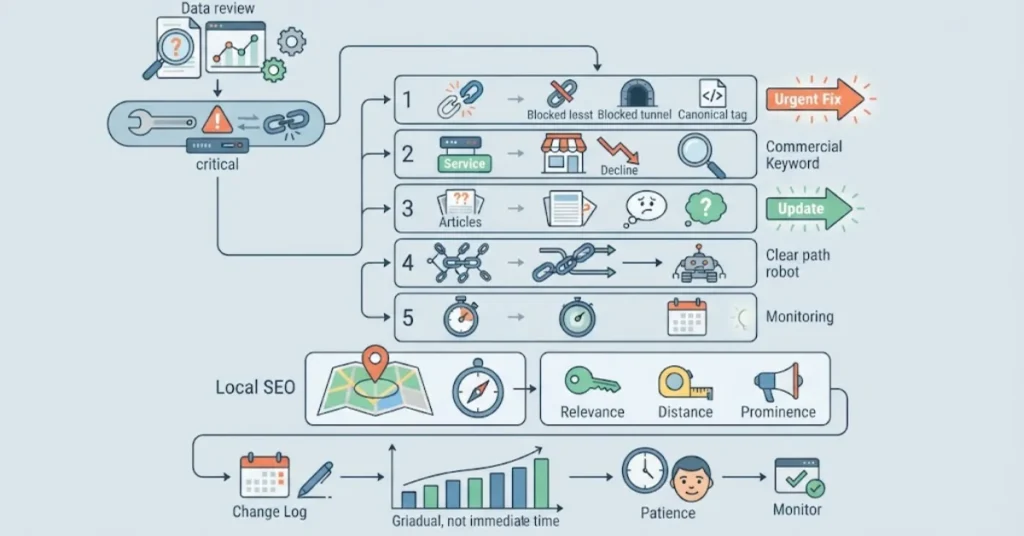
After reviewing the data, create a short list of confirmed problems and possible causes. Give each issue a priority based on its business impact, the number of affected pages, and the effort needed to resolve it.
A simple order is:
- Fix confirmed crawling, indexing, redirect, or canonical problems affecting important URLs.
- Improve service pages that have lost visibility for relevant commercial searches.
- Update articles that no longer answer the questions people are searching for.
- Improve internal links so readers and search engines can reach important pages.
- Monitor the results before making another major round of changes.
If your website targets local searches, include an assessment of the signals that help Google understand and evaluate a local business. Our guide to Google’s Local Ranking Factors: Relevance, Distance and Prominence explains these three key considerations and how they differ.
Avoid making many unrelated changes at once. When possible, record what you changed and when you changed it. This makes it easier to assess whether the work helped.
SEO improvements do not always produce immediate results. Google needs time to recrawl pages, reassess content, and update search results. Keep monitoring performance and avoid treating a short-term fluctuation as proof that a change succeeded or failed.